OOJS
Object-Oriented JavaScript
Here is an introduction to Object-Oriented JavaScript.
What is OOJS?
Using self-contained pieces of code to develop applications. We call these self-contained pieces of code objects, better known as classes in most object-oriented programming languages and functions in JavaScript.
What are the benefits of OOJS?
- Easier to test
- Reusability of code (within an application, across applications as plugins or modules)
- Less dependent on structure of the DOM (HTML)
- Methodology used by many client-side frameworks: Angular, Ember, React
- More efficient memory using prototypal inheritance
- Forces you to think "holistically" about the problem you are solving
- Write code that more closely models reality
- Easier to manage
scope
Code Example
Let's think about a page that involves a video player and the ability to transcribe the video into segments.
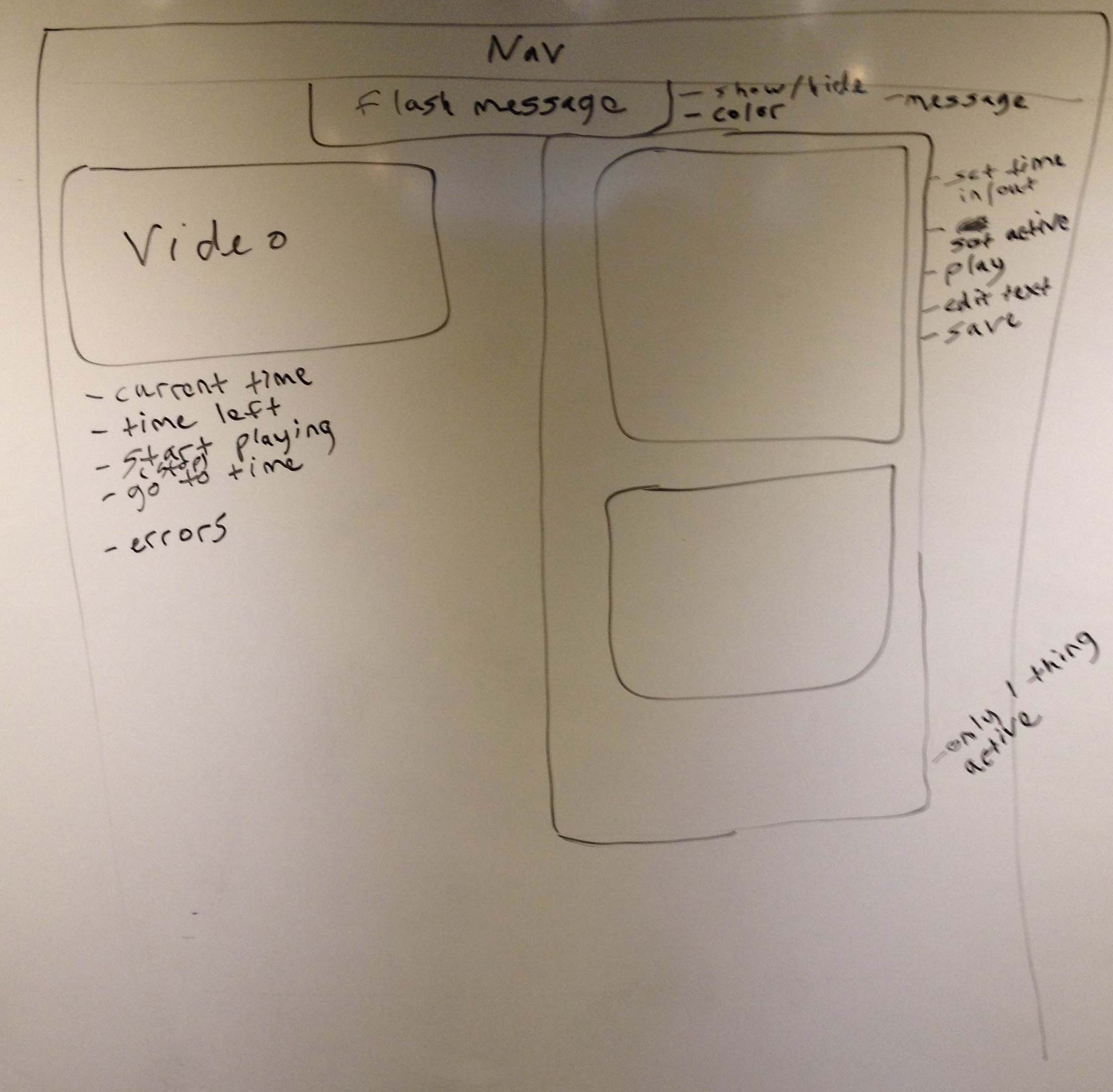 In reviewing this page, we see a few potential objects including
 Video, FlashMessage, RecordItems, RecordItem. In the picture above you can see what functionality each of these objects should have.
First we'll focus on an object called Video with the following functionality:
- Set/get current time
- Set/get time left
- Ability to start/stop playing
- Handle errors and notify users
The following code handles the functionality to track the current time and time remaining of the video as it plays.
`
$(function(){

var VideoConstructor = function(args){
    this.$video = $(args.videoSelector);
    this.video = this.$video[0];
    this.$currentTime = $('#current-time');
    this.$timeRemaining = $('#time-remaining');
    this.init();
  }

  VideoConstructor.prototype.init = function(){
    this.gatherTimes();
    this.updateTimes();
    this.addVideoListeners();
  }

  VideoConstructor.prototype.gatherTimes = function(){
    this.totalTime = this.video.duration;
  }

  VideoConstructor.prototype.timeLeft = function(){
    return (this.totalTime - this.currentTime());
  }

  VideoConstructor.prototype.currentTime = function(){
    return this.video.currentTime;
  }

  VideoConstructor.prototype.updateTimes = function(){
    this.$currentTime.html(this.currentTime());
    this.$timeRemaining.html(this.timeLeft());
  }

  VideoConstructor.prototype.addVideoListeners = function(){
    var obj = this;
    this.$video.on('timeupdate', function(){
        obj.updateTimes();
    });
  }

  var video = new VideoConstructor({ videoSelector: '#current_video' });

});